


NeverSink's LOOTFILTER v8.13.x♦ in-depth ♦ endgame+leveling 2in1 ♦ user-friendly ♦ SC/HC versions
|
Updated to 5.3
Changelog: - Fine-tuned the levelling section based upon user feedback and my HC Turmoil league experience! - 3-links are now more strict. - Reduced the number of magic trinkets later on. - Added ruby/topaz rings to the early high highlight rings sections (for the +1 caster recipes) - Early Life flasks are highlighted as good for one additional level - The levelling section shows less magic items now - T2 endgame trinkets are now correctly hidden on higher strictness versions. - Very slightly updated the divination cards and uniques (barely anything changed, economy is super stale) - Minor structure improvements Please don't PM me ingame with filter/guide questions, post them on the forum, after reading the FAQ.
|

|
|
Hey, ive been trying to setup to display leather belts as scrict filter and everytime i try to do that i receive the same message over and over:
Spoiler
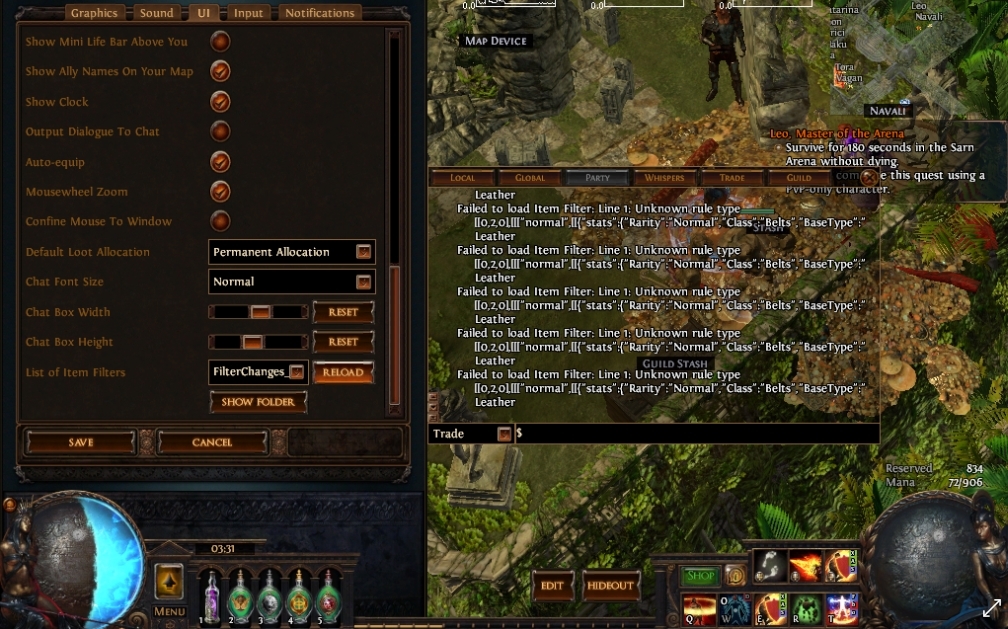 This currently my filter: http://www.filterblade.xyz/#rqrg1v3kKlqp Last edited by Arielmve#1954 on Nov 19, 2017, 12:38:32 AM
|

|
" You've downloaded the SAVE-file through the saveload screen. Instead go to the Download screen (highlighted in green) and download it from there. The caps-locked message "YOUR FILTER IS NOT A SAVEFILE" wasn't kidding. Please don't PM me ingame with filter/guide questions, post them on the forum, after reading the FAQ. Last edited by NeverSink#3349 on Nov 19, 2017, 4:34:42 AM
|
|
|
hi NeverSink,
is there any way to customize my current filter without its savefile? forgot to download the lastest savefile from your website the last time i edited my filter :\ sorry if this has been discussed before. |

|
" Partially. You can upload your filter file from the advanced screen. Limitations: 1) You won't be able to generate a save file anymore, you'll have to keep Download/Uploading 2) The customizer might not work completely, because your save file no longer matches the expected signature. You can however still use the Filter Structure Editor (advanced screen), which will allow you to change most things. Recommendation: Do the changes again. You can also use the new serverside-saving feature, that'll generate a URL that you can use to load/share your filter again. Please don't PM me ingame with filter/guide questions, post them on the forum, after reading the FAQ.
|
|
|
which of ur version hides garbage unique items? but still shows unqiue bases with valuable items like gold amulet for bisco
Every Class 100 Discord Alex22#8812 if u cant catch me online in Poe Last edited by Fyndel#2106 on Nov 30, 2017, 7:18:56 AM
|

|
" Literally NONE of his filters hides ANY uniques. Thats because loot filters can't filter uniques very well with the tools GGG provides. You can only filter by BaseType, and most BaseTypes have multiple different uniques. Some good, some bad. And you can't tell with a loot filter which of those just dropped. If you want to, you can customize that on http://www.filterblade.xyz/ tho. - ZoeyFloat, FilterBlade developer
|

|
|
For the sake of not going through 326 pages, when an update's issued is it ok to just overwrite the old files, or should they be deleted and the new ones copied over?
|

|
" I usually just overwrite the old file and never had any problems |

|
" It's the same, overwriting works just fine. " To expand upon Tobnac's answer - no version does that - "valuable" is highly subjective and also depends on the league (SC/HC/STD etc), meta-development and multi-base uniques. You can disable all the uniques by using www.FilterBlade.xyz and going to Customize -> Uniques -> Click Hide on the low unique tier. The risk and finetuning is up to you. Please don't PM me ingame with filter/guide questions, post them on the forum, after reading the FAQ. Last edited by NeverSink#3349 on Dec 1, 2017, 5:42:47 AM
|
|



